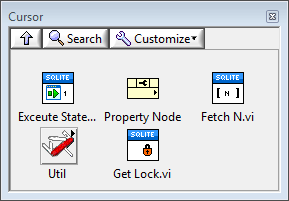
Cursor Palette
Execute Statement

Executes a single SQL statement terminated by a semicolon (;).
If multiple statements are included in the SQL statement input, only the first statement will be executed.
The statement may contain unnamed parameters and may return query results.
 SQLite3LV Cursor in/out
- A valid SQLite3LV cursor
 SQL statement
A valid SQL statement. Only the first statement found in the string will be executed. The statement may contain indexed parameters. Parameters are specified by a question mark (?). Refer to the SQLite3 documentation Binding Values to Prepared Statements article for more information on parameter binding syntax. Named parameters can only be accessed by index and the binding API is not aware of named parameters.
Values may be bound after executing this VI using property node binding.
Examples of valid SQL Statements:
SELECT `LastName` from `Persons`;
Returns zero or more results of type string. Use “Column String” property, followed by the “Rows Finished?” property to retrieve results.
SELECT `LastName` from `Persons` WHERE `LastName` GLOB ?
Returns zero or more results of type string. One string-typed query parameter. Use the “Bind String” property node after executing the query to bind the parameter. Use the “Column String” and “Rows Finished?” property to retrieve results.
SELECT ? + ?;
Returns a single result of arbitrary type. Accepts two parameters of arbitrary type. Use the “Bind DBL” two bind two input parameters. Use the “Column DBL” to retrieve the query result.
Property Node Binding
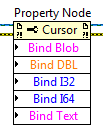
A property node may be used to bind values into an SQL statement that utilizes
parameter binding. The statement will be automatically executed after the Nth expected value
is bound. Supported types are Blob, Double, I32, I64, and Text. Blob data is bound as raw bytes
while Text data is bound as UTF-8 character data.
If fewer than expected values are bound, the statement will not be executed.
If more than expected values are bound, the extra values are ignored.
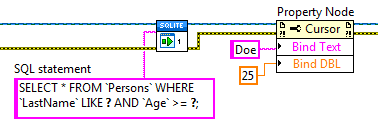
Example of property node binding
Property Node Query Results

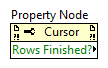
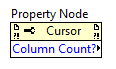
A property node may be used to retrieve values from a query. Values are extracted in the order defined by the property node. Client code is responsible for ensuring that the number of columns extracted matches the number of columns returned by the query.
Query results may be extracted as Blob, Double, I32, I64, or Text.
Blob data is returned as raw bytes. Text data is returned as a UTF-8 string.
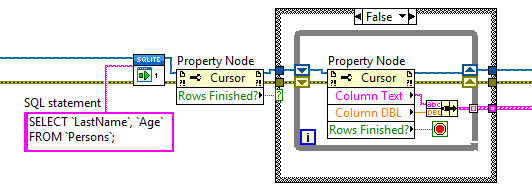
A special boolean property Rows Finished? will return TRUE if the query is finished and no further data is available in the query result.
The Column Count property can be used to determine the number of columns of data in the query result.
Example of property node query extraction
The following example demonstrates how to retrieve results from a query.
A shift-register ( ) is used to maintain cursor state within the while loop.
Fetch N Results


Use this VI to extract N rows of identically typed data from a query result. Manually select the polymorphic instance of the VI to use.
- SQlite3LV Cursor in/out
- A valid SQLite3 cursor
 n rows
- Number of rows to read (default is all rows, -1).
 result
- Query result (type depends on polymorphic instance)
 finished?
- Returns TRUE if all rows have been read from the query result.
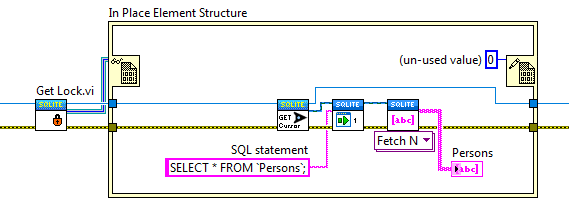
Get Lock

Returns a memory reference that can be used as a lock for the database connection. The contents of the memory reference are un-used (zero). Refer to the multithreading topic for further information.
The SQLite3LV::Get Lock VI will return the same lock for a given database connection. Either method may be used to obtain a lock for a database connection.
The following code snippet demonstrates how to use a database connection lock.
Cursor Utilities Palette
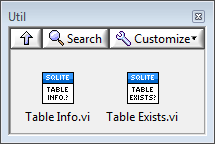
Table Info

Returns information about the specified table.
This VI is equivalent to executing PRAGMA table_info(table-name)
and formatting the results into an array of clusters.
- SQlite3LV Cursor in/out
- A valid SQLite3 cursor
- table
- Name of the table about which to retrieve information
 table info
- Information about the columns in the specified table
Table Exists?

Returns TRUE if the specified table exists in the database.
This subVI is equivalent to the following SQL query:
SELECT COUNT(name) FROM sqlite_master WHERE type='table' AND name = ?;
- SQlite3LV Cursor in/out
- A valid SQLite3 cursor
- table
- Name of the table to check
- exists?
- TRUE if the specified table exists