SQLite3 Palette
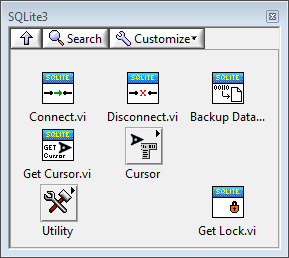
Connect

Opens a connection to an SQLite3 database. The database connection has behavior similar to a reference in LabVIEW, i.e. the connection can be passed as if it were a reference.
The path should be a valid resource. The default path is to open an in-memory database.
The SQLITE3 Open Flags must be a valid combination of open flags. Incorrect open flags will likely result in SQLITE3 error 21 (library misuse).
Refer to the sqlite3_open_v2() documentation for details.
 path
pathPath to an SQLite3 database
:memory: will create and open an in-memory database
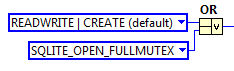
 SQLITE3 open flags
Flags to apply when opening the database.
Flags may be combined using the OR primitive. For example,
 SQLite3LV Connection out
A new SQLite3LV connection
The new connection will be invalid if there was an error opening the database connection.
Disconnect

Disconnects and releases all resources related to an SQLite3LV database connection.
Failure to disconnect from a database connection can cause a memory leak can will cause the database file to remain locked until the current application instance is closed.
It is possbile that the disconnection fails and an error is returned. In this case, appropriate error handling code should be implemented to prevent leaking the database connection.
Using this subVI on an invalid connection is a no-op.
 SQLite3LV Connection in
- The database connection to close.
Get Cursor

Returns a cursor for the specified database connection. The cursor data behaves like a cluster in LabVIEW, e.g. if used in a loop a shift register must be used to maintain the state of the cursor.
The cursor does not need to be released or closed.
- SQLite3LV Connection in/out
- The database connection
 SQLite3LV Cursor
- A new database cursor. The cursor may be used to execute queries using the parent database connection.
Backup Database

Initiates a backup from one active database connection to another. A second active database connection must be supplied to this function.
Refer to the SQLite3 backup API documentation for more information regarding backing up databases.
This VI may be used to backup an in-memory database to a disk-based database.
The database IDs input controls the name of the source and destination database (default is MAIN)
Progress notifications will be posted to the optionally supplied U8-typed user event. Progress is reported as values ranging from 0 to 100.
The destination database is automatically locked for the duration of the backup operation.
The source database may be locked and unlocked multiple times during the backup operation so that other threads may use the source database connection while the backup operation is in progress.
- SQLite3LV Connection src in/out
- The source database connection
- SQLite3LV Connection dst in/out
- The destination database connection. This connection will remain locked throughout the backup operation.
 database IDs (optional)
- Names of the source and destination database. Defaults to “MAIN”.
 progress event (optional)
A U8-typed event reference. Backup progress will be periodically posted to this event. Use a LabVIEW event structure to capture progress notifications.
Progress vaules range from 0 - 100.
Get Lock

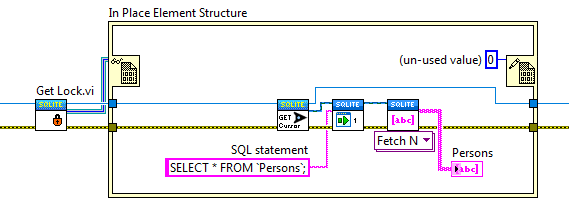
Returns a memory reference that can be used as a lock for the database connection. The contents of the memory reference are un-used (zero). Refer to the multithreading topic for further information.
The Cursor::Get Lock VI will return the same lock for a given database connection. Either method may be used to obtain a lock for a database connection.
The following code snippet demonstrates how to use a database connection lock.
SQLite3 Utilities Palette
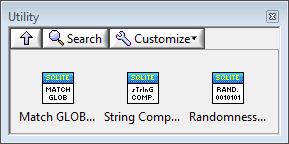
Match GLOB

This VI can be used to apply the SQLite3 GLOB matching function to an arbitrary pair of strings. GLOB matching is case-sensitive.
- string
- String to test
- GLOB
GLOB pattern to use.
For example, the GLOB “
ca*” matchscat,car, andcake, but doesn’t matchCAT. match?
- Returns TRUE if the glob matches.
String Compare (case in-sensitive)
c.png)
This VI can be used to compare two strings using the SQLite3 API case in-sensitive string comparison function.
- string A
- String to test
- string B
- String to test
 result
Result of the string comparison.
positive if A > B
zero if A == B
Randomness

Generates random bytes using the pseudo-random number generator in the SQLite3 API. Refer to the SQLite3 API documentation for details.
 nbytes
- number of bytes of pseudo-random data to generate
 random bytes
- result containing pseudo-random data